SPB Time3.5.3
Publisher Description
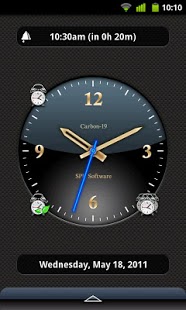
This application is no longer supported.
Please note that devices with Android OS 4.x are not supported.
SPB Time is an advanced, skinnable time toolbox for your Android phone. Analog and digital clock modes, World clock, timers and stopwatches, and advanced alarms. A lot of time-related functions in this world's bestselling application!
Features:
- Analog and Digital clocks
- Classic, Bio and Paranoid alarms
- 6 Homescreen widgets
- World time
- Moon phases
- Stopwatches
- Timers
- 30+ FREE themes
- Online skin catalog
If you are not able to download purchased application please check that your order wasn't declined by Google Checkout. You can check your order state at http://checkout.google.com.
Please rate the app if you like it. If you have any questions or comments, please email us at support@spband.yandex.ru.
Keywords: SPB Time, alarm, clock, widget, world time, calendar, skin, theme, analog and digital clocks
About SPB Time
The company that develops SPB Time is SPB Software. The latest version released by its developer is 3.5.3. This app was rated by 8 users of our site and has an average rating of 2.1.
To install SPB Time on your Android device, just click the green Continue To App button above to start the installation process. The app is listed on our website since 2012-10-18 and was downloaded 568 times. We have already checked if the download link is safe, however for your own protection we recommend that you scan the downloaded app with your antivirus. Your antivirus may detect the SPB Time as malware as malware if the download link to com.softspb.time is broken.
How to install SPB Time on your Android device:
- Click on the Continue To App button on our website. This will redirect you to Google Play.
- Once the SPB Time is shown in the Google Play listing of your Android device, you can start its download and installation. Tap on the Install button located below the search bar and to the right of the app icon.
- A pop-up window with the permissions required by SPB Time will be shown. Click on Accept to continue the process.
- SPB Time will be downloaded onto your device, displaying a progress. Once the download completes, the installation will start and you'll get a notification after the installation is finished.
Program Details
System requirements
Download information
Pricing
Version History
version 3.5.3
posted on 2012-10-18
version 2.1.5
posted on 2007-04-16
Compatible with Windows Mobile 5.0, Windows Mobile 2003 SE, Windows Mobile Phone, Pocket PC VGA devices
